Kinovea for Mac and iOS: Best Free Alternatives in 2026
Let’s get straight to the point: Kinovea does not run on Mac. There is no iOS app. If you found this page searching for “Kinovea for Mac” or “Kinovea iPhone,” that’s your answer — and this article will help you find what you actually need.
Kinovea is an excellent Windows-only tool. The alternatives below depend on your use case: are you analyzing individual technique, or reviewing tactical plays with your team?
What Is Kinovea and Why Do Coaches Use It?
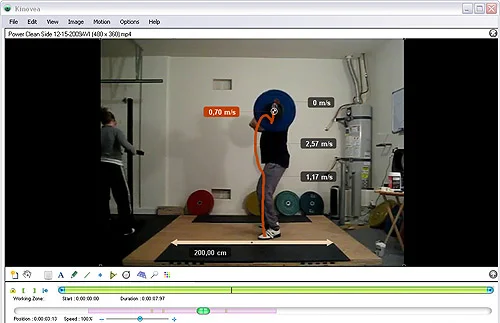
Kinovea is a free, open-source video analysis tool for Windows, actively maintained and widely used in sports science and coaching. Its strengths are biomechanical:
- Frame-by-frame analysis with precise time control
- Angle measurement tools (automatic and manual)
- Trajectory tracking and speed estimation
- Side-by-side video comparison (synchronized)
- Export of data for scientific processing
It’s particularly strong for athletics, swimming, gymnastics, and racquet sports — any sport where individual technique analysis matters. For team tactical analysis (drawing plays, sharing clips with 15 players via WhatsApp), it’s not the right tool even on Windows.
Why Kinovea Doesn’t Work on Mac or iOS
Mac
Kinovea is built on .NET and GDI+ — technologies tightly coupled to the Windows ecosystem. While Wine or CrossOver can sometimes run Windows software on Mac, Kinovea’s video rendering and real-time playback are unstable in those environments. It’s not officially supported, and the community reports frequent crashes.
iOS / Android
There is no mobile port of Kinovea, and none is planned in the current roadmap. The project is maintained by a small team focused on the Windows desktop application.
The Best Free Kinovea Alternatives for Mac, iOS, and Any Device
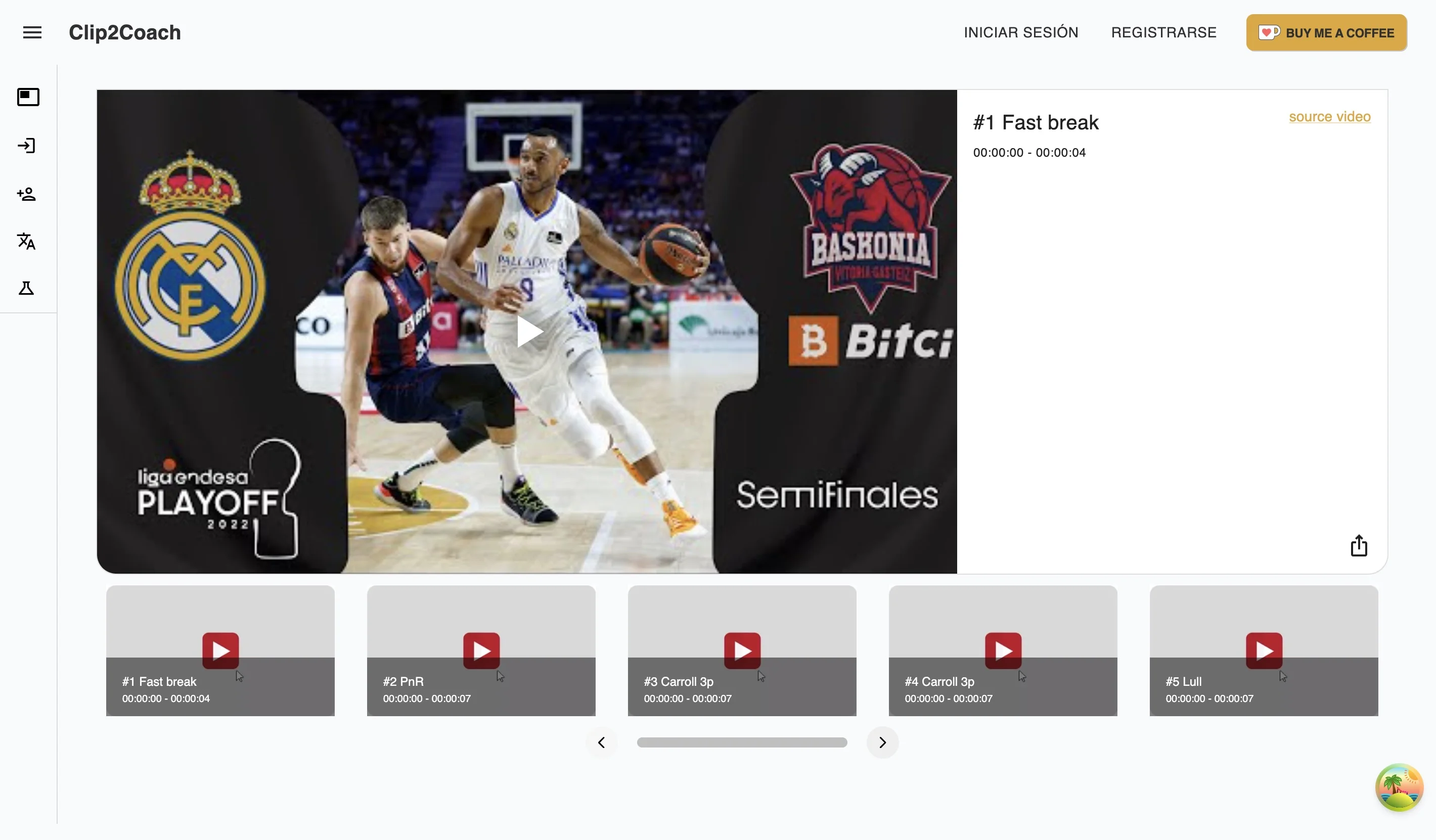
1. Clip2Coach — Best for team tactical analysis on any device
Clip2Coach works in any browser — Mac, iPad, iPhone, Android, Chromebook — with no download or installation needed.
Key features:
- Use videos from YouTube, Vimeo, or Twitch — or upload your own recorded footage
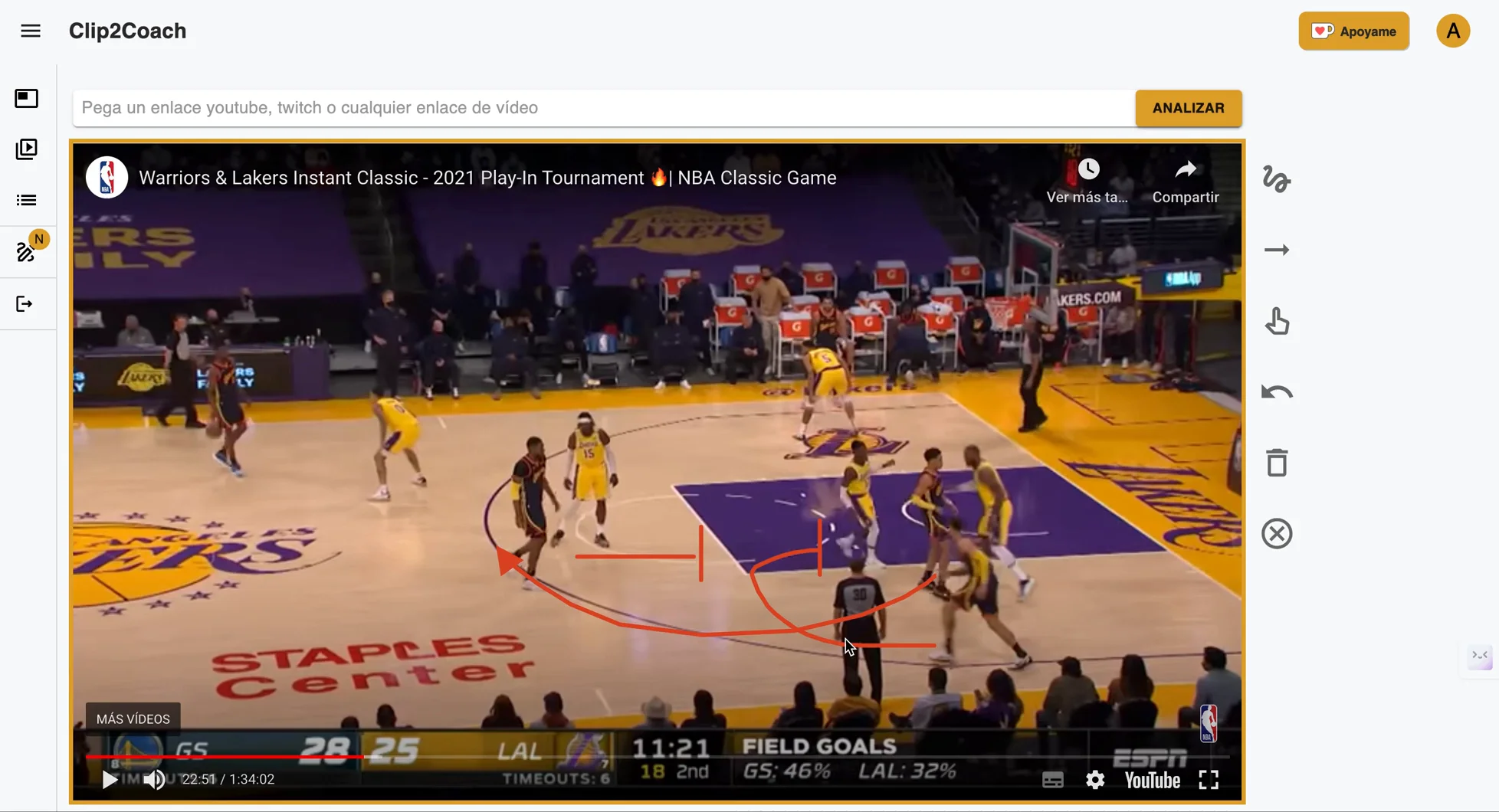
- Drawing and annotation tools on any frame
- Share clips via WhatsApp or link (players don’t need an account)
- Clips ready instantly in the cloud — no rendering wait
Be honest about the use case difference: Clip2Coach is designed for team tactical analysis — reviewing plays, annotating formations, sharing feedback before training. It doesn’t have Kinovea’s biomechanical measurement tools (angle tracking, trajectory analysis). If you need those on Mac, the closest option is Dartfish Express.
Pricing: 10 free clips/month + 20 welcome credits. Pay-as-you-go packs if you need more.
2. myDartfish Mobile — Best for individual technique analysis on iOS
myDartfish Mobile (iOS/Android) is the closest alternative to Kinovea’s use case on mobile. It offers slow-motion playback, angle measurement, and drawing tools for individual technique review.
Pricing starts at 7€/month with a 15-day free trial — no permanent free tier. The paid Dartfish platform (desktop) is significantly more expensive, but the mobile app is an accessible entry point for coaches who need biomechanical analysis on a phone.
3. Coach Logic — Team video analysis, iOS/Android/web
Coach Logic is a team video analysis platform with drawing tools, playlists, and a team feed. Works on iOS, Android, and web — no Windows dependency. Requires uploading your own footage. From £385/team/year with a free trial.
4. MotionShot — iOS, niche movement analysis
MotionShot creates multi-exposure motion analysis images (think sequence shots of a golf swing or a throwing motion). Niche use case, but useful for coaches who want to show movement mechanics visually.
Comparison Table: Kinovea vs Alternatives
| Tool | Price | Mac | iOS | Angle tools | Online video | Team sharing |
|---|---|---|---|---|---|---|
| Kinovea | Free | — | — | ✓ | — | — |
| Clip2Coach | Free (10/mo) | ✓ | ✓ | — | ✓ | Via link |
| myDartfish Mobile | 7€/mo (trial) | — | ✓ | Basic | — | — |
| Coach Logic | £385+/year | ✓ web | ✓ | — | — | ✓ |
Which Kinovea Alternative Should You Use?
Biomechanical analysis on Mac → Dartfish Express is the closest (iOS needed) or consider a Windows VM running Kinovea.
Team coach who wants to share clips on any device → Clip2Coach. Import from YouTube, draw on the frame, send via WhatsApp.
Individual technique analysis on iPhone → myDartfish Mobile (7€/mo). Team coach who wants Hudl-like workflow on Mac/iOS → Coach Logic (from £385/year, free trial).
Scientific/professional use on Mac → A Windows VM with Kinovea is probably worth the hassle if you depend on its measurement tools.
Running Kinovea on Mac with Wine — Is It Worth It?
For most coaches: no. The setup time (installing Wine or CrossOver, configuring it, dealing with crashes) isn’t worth it when your goal is reviewing and sharing training clips. Wine works better for productivity apps than for software with demanding real-time video rendering.
If you’re a sports scientist who specifically needs Kinovea’s measurement data and you’re stuck on Mac, it may be worth trying CrossOver — but manage expectations. For coaching video work, a browser-based alternative will serve you better.
FAQ
Does Kinovea work on Mac? No. Kinovea is a Windows-only application. There is no native Mac version and no official support for running it on macOS.
Is there a Kinovea app for iPhone or iPad? No. There is no iOS or Android version of Kinovea, and none is planned.
Free Kinovea alternative for team coaches on Mac? Clip2Coach works in any browser including Safari on Mac and iPad. It’s designed for team tactical analysis rather than biomechanical measurement.
Does Kinovea work on Chromebook? No native version. Clip2Coach works in Chrome on Chromebook without installation.
Is Kinovea still being updated in 2026? Yes. Kinovea is actively maintained on Windows, with regular releases. The project remains one of the best free biomechanical analysis tools available — just not cross-platform.
Start today by visiting Clip2Coach and discover how you can transform your coaching through free and accessible sports video analysis.